Find Your Way Around the Dashboard
After creating and verifying your account, open the cloud dashboard. The English interface calls this page Dashboards.
Read Your Account Status
Your Financial Status shows Current Credit and Current balance. Credit is available prepaid funds; the balance relates to amounts due. Read the currency beside each amount: account credit and service invoices can use different currencies.
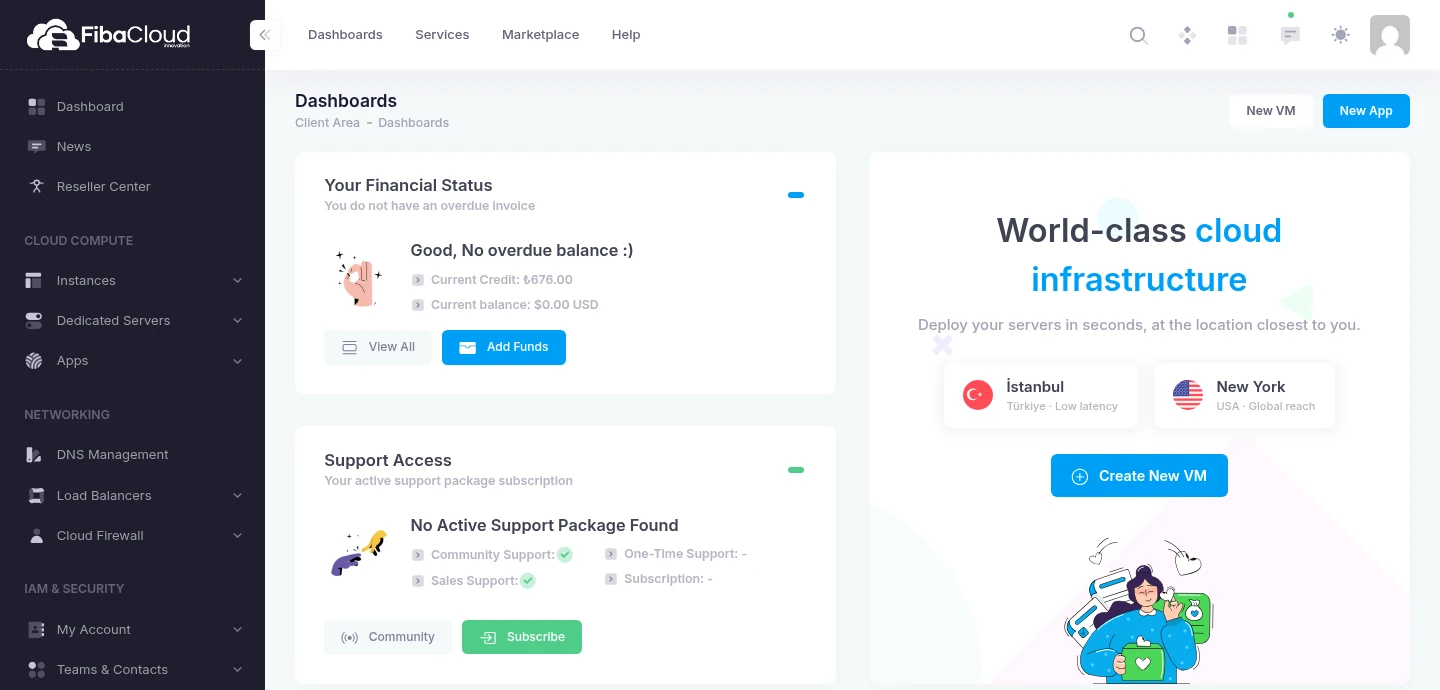
The example account shows ₺676.00 in credit after a server order. This is an account-specific example, not starting credit.
Further down, Your Recent Services lists services with their status, billing cycle and price. Open Instances to view your servers and select a service for its management page.
Choose Your Next Task
| Task | Where to start in the English panel | Related guide |
|---|---|---|
| Review credit and invoices | View All, Add Funds, or Billing | Billing overview |
| Order a server | New VM, Create New VM, or Add Instances | Create an Instance |
| Connect to a server | Instances, then the service | Connect with SSH |
| Manage your account | My Account | Settings, 2FA |
| Find help | Support Center or Documentation | Support |
Opening an order page does not itself create a server. Review the plan, location, operating system, tax and final total before submitting.
If Verification Still Appears
Complete email verification for the address in the prompt. Seeing the dashboard behind that prompt does not mean verification is complete.